Part 1 – Creating a new format for *.datadict files and why
Once or twice a year, there’s a game trilogy my wife and I like to play together. It’s a little-known series called the Deathspank series. It’s a comedic take on diablo style RPG loot grind games. It was made by a studio called Hothead games who seem to make exclusively mobile games these days. Originally, playing this game was a ploy to get my wife into gaming by playing a game where I can play the healer sidekick and she gets to do the bulk of the action as the game’s protagonist, but we’ve both come to really enjoy the series because of its great potential. However, every time we play through the trilogy we end up thinking things like, “wouldn’t it be great if this was different”, or “I wish the weapons worked like this” or “I wish my inventory wasn’t so annoying to manage”. I finally decided to do something about these annoyances recently. I set out to write my own mods for the game to improve a trilogy my wife and I have come to love so much.
This post will outline my efforts to modify the individual game files contained in the game’s “.gg” formatted archive files. First, let me say, to the unpack and repack the files from the archives, I’m using a tool created by a modder named Xraptor that can be found here. I’m not a huge fan of running modding tools created by people who don’t share their source code, but I haven’t completed work on my own packer tool and I’m fairly certain the program is safe to use.
The very first goal I needed to accomplish before I could start modifying anything was to understand the data contained inside the files and their structure. The bulk of the game’s data files are contained in the GameData-000000000.gg” archive. Once unpacked, the files are located in the Build>Data folder. Unfortunately when I opened the first .datadict file I found in a notepad editor, I saw something that looked like this:
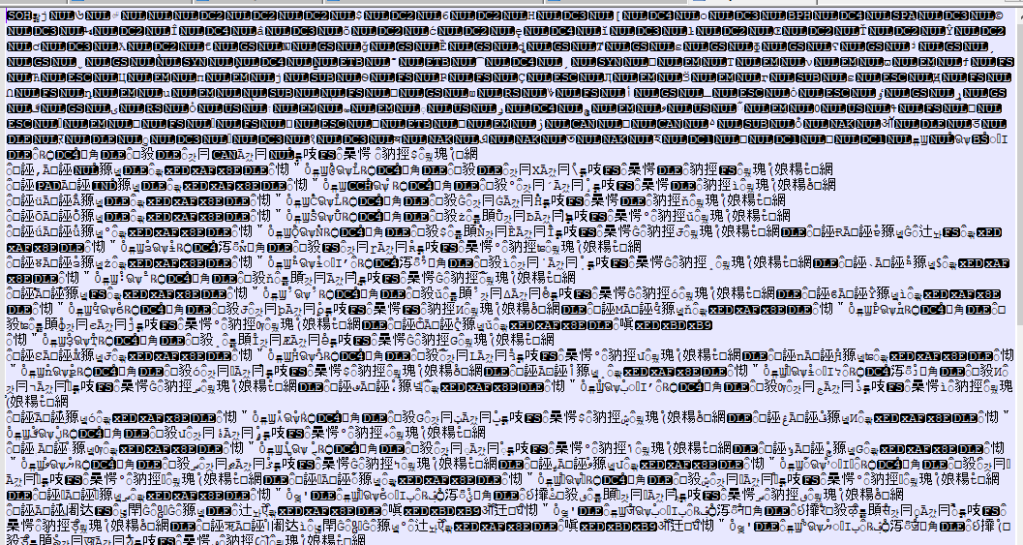
Yikes! It turns out the files contain binary data that is not easily editable inside a simple text editor. I was going to need to use a hex editor for this. Embarrassingly, I had no idea how to interpret hexadecimal at the time. I had a good grasp on binary thanks to the work I’ve done with networking and subnetting, but I had never looked into hexidecimal before this. A quick Google search gave me the information I needed, so I set out to reverse engineer the structure of the files.
File Structure
File Header
Each file is comprised of 4 sections, the beginning header block, the number of attributes per object block, the attribute description block, and the final data block where object data is stored. Lets start at the beginning. The beginning of the file contains several header fields. 4 to be exact. In all of the following examples I’m going to be using real data from the file that describes boss data. I will generally be capturing images from the hexeditor with the data organized into rows with 8 columns (bytes) because that is the easiest way to visually see the structure of this file type.

In the above image, I’ve highlighted the four header data fields. These field are each made up of 4 bytes in little endian format. The first field (first 4 bytes) serve as an identifier for the file type. The pattern 0x01,0x00,0xC7,0xD1 shows that this is a Deathspank “.datadict” file. Moving on, the second four bytes describe the number of objects that are described within the file. This file therefore describes the data for 8 objects. The third field can be thought of in several different ways. I think of this number as a representation of the length of the attribute lookup table that is found further into the file. Because each object attribute is described using a sequence of 8 bytes, the section of the file that describes the object attributes should be 1296 bytes in length (0xA2 * 8). The last field in the header block describes the length of the object data portion of the file. These file sections may be a bit confusing at the moment, but they should hopefully make sense by the end of the post.
Number of attributes per object
The next section of the file deals with how many attributes each of the 8 objects will have. Not all objects of the the same type (weapon, armor, item, boss, enemy) have the same number of attributes, so this section defines the number of attributes each object contains.
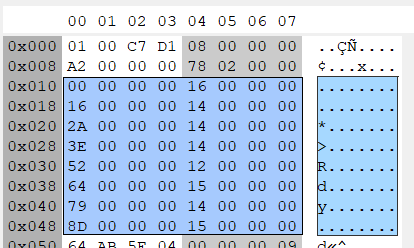
First, notice that there are 8 rows of data here. Each row corresponds to a particular in-game object. The first 4 bytes are an offset value used to locate where the object’s attribute descriptions start in the the next section of the file (the object attribute description block). The second four bytes tell you how many attributes that particular object will have. Starting at the beginning, as you might expect, the first object’s attributes start at offset 0x00 which is the very beginning of that section of the file. The second 4 byte series tells us that the object will have 0x16 ( 22) attributes. Because each attribute is always described with an 8 byte sequence, this means the first object will take up 0x16 * 8 (176) bytes. Going to the next object, it makes sense that this object’s starting offset is 0x16 * 8 (number of attributes times 8 bytes per attribute) or 176.
Object Attribute Description
Moving on, the next section of the file describes the details of each attribute. Each attribute contains the following information: 4 bytes describing the type of attribute being described like a name, damage modifier etc. I consider this the attribute description. This is followed by 3 bytes telling us where to find the in-game value for the attribute in the next section of the file (the data block). Finally, there is a single byte describing the information type for the attribute. For example an information type of 0x0D means this attribute is a string and 0x09 is a 4 byte (32 bit) integer.
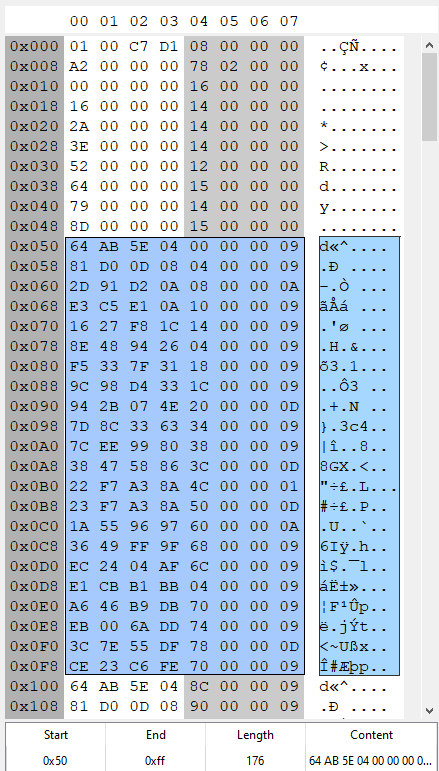
In this screenshot we can see the data structure changes when we get to the attribute description portion of the file. The highlighted section represents the first object’s attributes and their properties. Notice that there are 22 lines (8 byte segments) of attribute data and the length of the attribute data is 176 bytes just as we expected from our analysis of the previous “attributes per-object” portion of the file. Also, you can see that after the 22 lines describing the first object’s attributes, the attribute identifier (the first 4 bytes) start the repeat as we move on to the second object’s attributes.
Analyzing the very first attribute for the first object in the file we can see the attribute has a title/description/identifier of 0x64,0xAB,0x5E,0x04. The next 3 bytes tell us that the data for this attribute can be found at offset 0x00 inside the data block portion of the file. The last 1 byte of the 8 byte sequence tells us what type of data we expect to find at offset 0x00 in the data block. Type 0x09 means we can expect to find a 32 bit, 4byte integer value. I’m not 100% sure what every data type signifies, but I have learned the lengths of each data type.
- Data type 0x01 and 0x09: 4 bytes
- Data type 0x06 and 0x0A: 8 bytes
- Data type 0x0C: 16 bytes
- Data type 0x0D: variable length string data. This will always be a multiple of 4 bytes in length with 0x00 bytes terminating the string. To find the length of this data I run a check for the first occurrence of a 0x00 after the starting offset of the string. I run a check to see if the string length is evenly divisible by 4. If that fails I move one byte further in the data block and repeat the check. This should always give the correct data value for the string.
The Data Block (and the root of our issues)
Finally, we’ve come the portion of the file that contains the data we want to modify. From the image above, we can find the in-game value for the first object in the file for attribute 0x38,0x47,0x58,0x86. It shows that this data should be a string and should be found at offset 0x3C (60). Moving to the data block we can see that we do indeed find a string at that location.
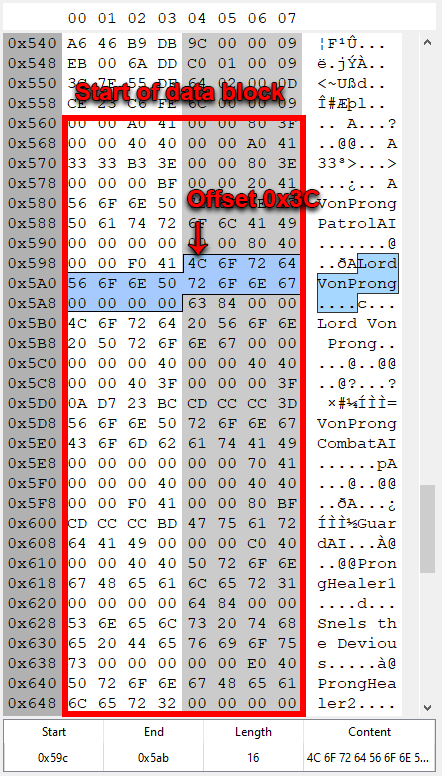
Using all of the pointers and offsets of the previous data, we should be able to lookup any in-game value contained within any given .datadict file. Using this knowledge, I wrote a simple program that converted the binary data into something human readable, XML.
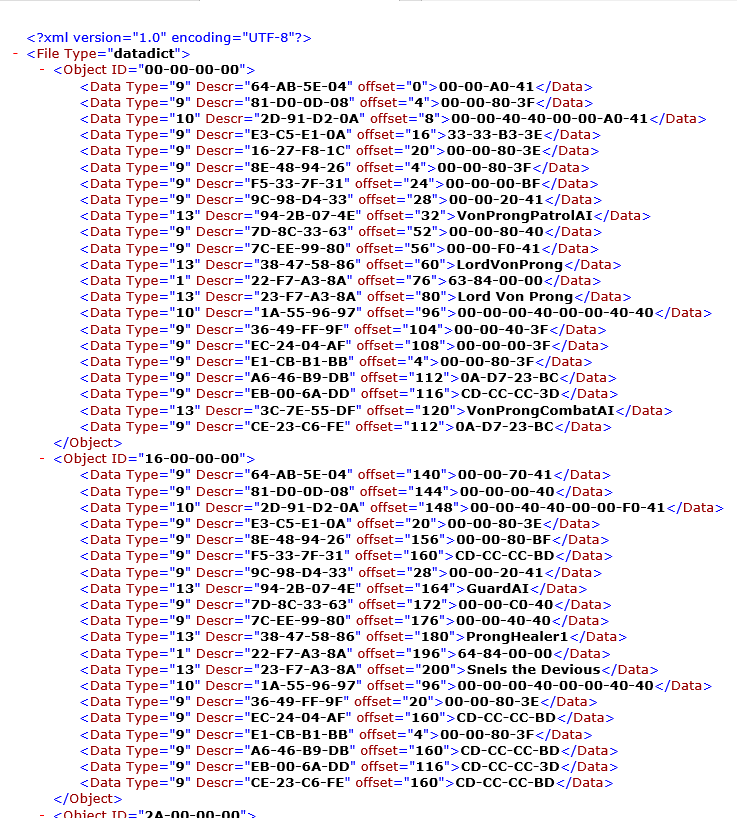
Using this converted data I started changing values in the files to see what would happen in game. One of the first things I tried to do was to remove the arbitrary items per stack limit that is placed on consumable items like the one that summons an army of skeletons. Normally you can only hold 5 of these in your inventory at a time and there can only be 1 “stack” of them in your inventory at a time. I wanted to change this limit to 99 items per stack. In the original game, these items were really fun but they are so scarce and limited that you end up never using them and I wanted to change that. Quickly after modifying a few values for this consumable item, I noticed other in-game values were changed like weapon damage values and other random things. Going back to the data files the reason for this became very obvious.
Take a look at the image above. The first object in the list (ID 00-00-00-00) has several attributes that point to the same exact data block offset and the same data as other attributes. This means that the file employs a form of compression where it will never record the same value twice in the data block portion of the file. Instead, it will check if the value exists in the data block and if it does, it will just set the attribute data offset pointer to the existing value in the data block. This explains why multiple things were changing in the game when I was only tweaking a single value. It turned out that many objects were using the same data and when I changed it for one thing, it changed the value for all the objects that shared that value.
Fixing The Issue
At this point, the objective was perfectly clear. I needed to write a program that would read the game’s native files, remove any overlapping values in the data block so each object’s attributes can be edited individually, and update all of the offsets and pointers through the file so the game engine can still interpret the files correctly. I needed to do while keeping the native structure of the existing files. Using what I had already done to convert the files to .XML format, this wasn’t too difficult and for the most part, the files weren’t even that much bigger in size afterward.
Moving Forward
If you’ve followed along to this point you might be hoping for the source code to these programs, but I’m not ready to release them just yet (I certainly will soon ™ on github with full source code once I finish the companion app to to this work). If you understood the information in this this post, you should have everything you need to edit the files on your own and even potentially write you own file format converter. My next step is to write a simple app that lets you edit the newly created files in a convenient way. I’ve worked out what some of the attributes do but modifying the files is still a huge pain in the butt if you want to change the values for 10 different items at the same time.
Therefore my next goal is to create this new file editor application and then release both tools simultaneously so others can have fun modding Deathspank like I have. In all of my development thus far, I’ve used Azure Dev ops as my code repository because it’s private and I already use it for storing the code I write for my job and various personal projects. Please note, I’m by no means a professional programmer. I simply like to tinker with things in my spare time. I’ll be making a public github repository for these Deathspank apps so the tools are available for everyone. In my next post I’ll have a link to the code for both apps.
Long Term Goals
After making and sharing the two apps I described earlier, my long term goals are:
- Write a new *.gg archive unpacker/re-packer that is compatible with all 3 games in the series. There is currently a tool for this but it doesn’t work for any of the DLC games files. I’ve been working on this fun project which involves breaking the archive encryption scheme. I think I have a solution for every form of encryption used in the archives. There is one for the file names and file descriptions and another form of encryption for the file data.
- Finish a complete set of modified files a.k.a a “mod” and release it on nexus mods for others who want a different in-game experience with modified game balance, level cap, experience gains, special ability powers , sidekick abilities, character models etc .
- Fix a game crashing glitch present in the 3rd game caused by improper enemy spawn points in Chastity Nuclear’s quest area.
Until next time, happy modding!
 Overkill Scripting
One thought on “Hero to the Downtrodden: Reverse Engineering and Improving Deathspank”